← All posts
HTML & CSS70 min total · 18 parts
CSS Fundamentals: The Box Model, Specificity, Positioning, and Layout
Contents — Part 2 of 18: The Box Model
- 1.Overview
- 2.The Box Model
- 3.box-sizing: content-box vs. border-box
- 4.Margin Collapsing
- 5.Normal Flow: Block, Inline, and Inline-Block
- 6.The Cascade, Inheritance, and !important
- 7.Specificity: How CSS Breaks Ties
- 8.Selectors Deep Dive: Combinators and Attribute Selectors
- 9.Pseudo-classes and Pseudo-elements
- 10.Positioning and Stacking Contexts
- 11.Units: px, %, em, rem, and Viewport Units
- 12.Flexbox In Depth
- 13.Grid In Depth
- 14.Flexbox vs. Grid: Choosing the Right Tool
- 15.Responsive Design: Media Queries and Container Queries
- 16.CSS Custom Properties (Variables)
- 17.Accessibility Basics That Affect Real Usage
- 18.Common Mistakes Worth Remembering
Part 2 of 18 · ~1 min
The Box Model
Every element renders as a rectangle built from four layers, from the inside out:
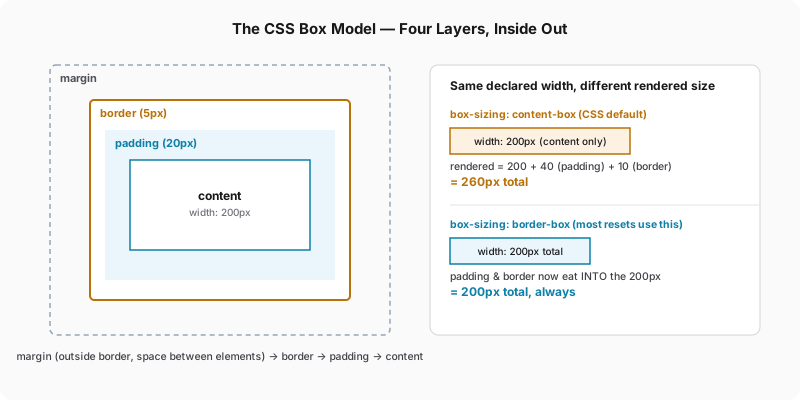
- Content — the actual text, image, or children
- Padding — space inside the border, part of the element's own background
- Border — the edge itself, drawn between padding and margin
- Margin — space outside the border, between this element and its neighbors, and always transparent
Two elements can look identical but behave completely differently once you resize the page, purely because of how their width/height interact with padding and border — which is exactly what box-sizing controls.
.card {
  width: 300px;
  padding: 20px;
  border: 2px solid #ccc;
  margin: 16px;
}
Nothing about this rule says how wide .card actually renders on screen — that depends entirely on box-sizing, covered next.