← All posts
Docker65 min total · 19 parts
Docker Fundamentals: Images, Containers, and Writing a Good Dockerfile
Contents — Part 3 of 19: Image vs. Container
- 1.Overview
- 2.What Problem Docker Actually Solves
- 3.Image vs. Container
- 4.The Docker Engine's Moving Parts
- 5.Images Are Made of Layers, and Layers Are Cached
- 6.Dockerfile Instructions, One by One
- 7.CMD vs. ENTRYPOINT: The Instruction Everyone Mixes Up
- 8.Multi-Stage Builds
- 9..dockerignore and the Build Context
- 10.Choosing a Base Image
- 11.Networking Basics
- 12.Volumes, Bind Mounts, and tmpfs
- 13.Docker Compose: Running More Than One Container Together
- 14.Health Checks and Restart Policies
- 15.Environment-Specific Configuration
- 16.Security Basics
- 17.Debugging a Running Container
- 18.Resource Limits
- 19.Common Mistakes Worth Remembering
Part 3 of 19 · ~1 min
Image vs. Container
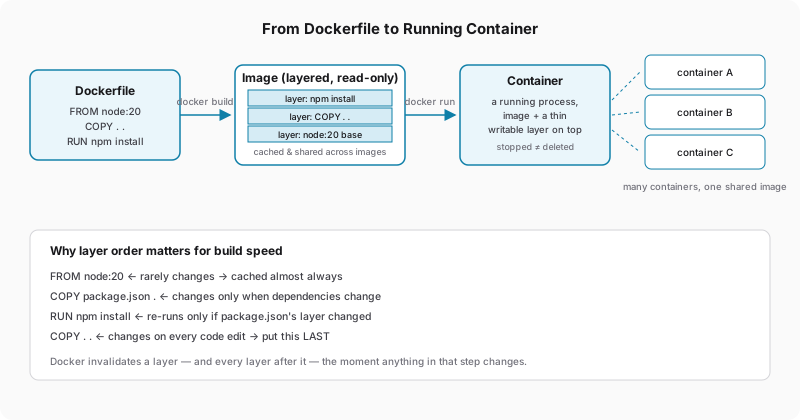
- An image is a read-only template — your application code plus its runtime, libraries, and OS packages, built once from a
Dockerfile. - A container is a running instance of an image — the image itself, plus a thin writable layer on top for anything the process changes at runtime.
One image, many containers: you can start ten containers from the same image, each an independent, isolated process, without rebuilding anything. Stopping a container doesn't delete it — its writable layer (and any data written into it) is still there until you explicitly remove it with docker rm. This is a common point of confusion: docker stop just sends a termination signal to the process and leaves everything else in place; the container still exists, still shows up in docker ps -a, and can be restarted with docker start.
docker run --name web1 -d myapp        # container 1, from the myapp image
docker run --name web2 -d myapp        # container 2, same image, fully independent
docker stop web1                       # web1's process stops; its filesystem still exists
docker start web1                      # picks right back up — same writable layer as before
docker rm web1                         # NOW web1 and its writable layer are actually gone