← All posts
Git65 min total · 17 parts
Git Internals and Workflows: Branching, Merging, and Rebasing
Contents — Part 4 of 17: Merge vs. Rebase: Same Two Branches, Different History
- 1.Overview
- 2.A Commit Is a Snapshot; a Branch Is Just a Pointer
- 3.HEAD, the Working Tree, the Staging Area, and the Repository
- 4.Merge vs. Rebase: Same Two Branches, Different History
- 5.Fast-Forward vs. True Merges
- 6.The One Rule That Prevents Most Git Disasters
- 7.Resolving a Merge Conflict
- 8.Resolving a Rebase Conflict
- 9.Interactive Rebase: Squash, Reword, Reorder
- 10.Cherry-Picking Commits
- 11.git reset vs. git revert vs. git checkout/git restore
- 12.Stashing Work in Progress
- 13.Common Branching Workflows
- 14.Tags and Releases
- 15.Remotes, Fetch vs. Pull, and Force-Pushing Safely
- 16.Undoing Mistakes: The Reflog as a Safety Net
- 17.Common Mistakes Worth Remembering
Part 4 of 17 · ~2 min
Merge vs. Rebase: Same Two Branches, Different History
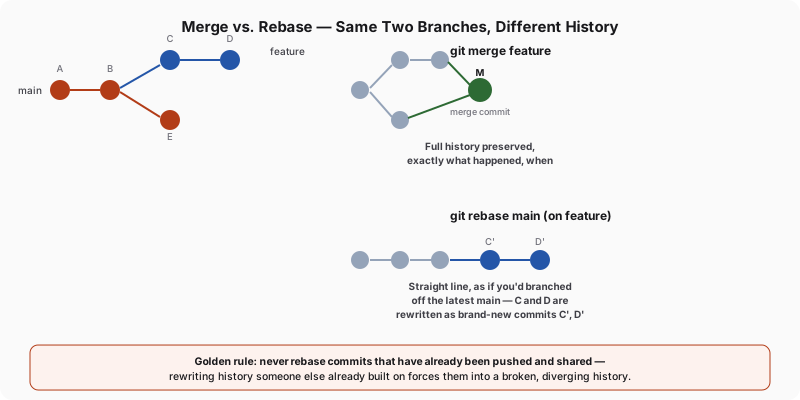
Both answer the same question — "bring feature's changes into main" — but they record the answer completely differently:
git merge feature(run frommain) creates a new merge commit with two parents, joining both histories exactly as they happened. You can always see when and how the branches diverged and rejoined, because that information is preserved permanently in the graph.git rebase main(run fromfeature) rewrites feature's commits one by one on top of main's latest commit, producing a straight line — as if you'd started the feature branch now instead of when you actually did. The original commits are replaced with brand-new ones (different hashes, even though the actual code changes are identical), and the old commits become unreachable from feature once the rebase completes.
# Merge: preserves exact history, adds a merge commit
git switch main
git merge feature

# Rebase: rewrites feature's commits onto the tip of main
git switch feature
git rebase main
| Merge | Rebase | |
|---|---|---|
| History shape | Branching, with merge commits showing where things joined | Linear — looks as if development happened sequentially |
| Original commit hashes | Preserved | Replaced (new hashes, same content) |
| Safe on already-pushed/shared commits | Yes | No — see the next chapter |
git log --graph readability | Shows true concurrent development | Reads as if there was never more than one line of work |
| Typical use | Integrating a finished feature branch into main | Cleaning up your own local commits before sharing them, or keeping a long-lived branch current with main without a merge commit each time |
Neither is universally "correct" — many teams use rebase for keeping a personal feature branch current with main during development, then merge (often with --no-ff to force a merge commit even when a fast-forward would be possible) when the feature is actually done, to leave a clear record in history of when it landed.