← All posts
Auth & Security60 min total · 19 parts
OAuth 2.0 and JWT Explained: How "Login with Google" Actually Works
Contents — Part 4 of 19: The Authorization Code Flow, Step by Step
- 1.Overview
- 2.OAuth Is Authorization, Not Authentication
- 3.The Actors in an OAuth Flow
- 4.The Authorization Code Flow, Step by Step
- 5.Why the Authorization Code Flow Is Secure by Design
- 6.PKCE: Authorization Code Flow for Public Clients
- 7.Other OAuth Grant Types
- 8.Scopes and Consent
- 9.What's Actually Inside a JWT
- 10.JWT Signing Algorithms: HMAC vs. RSA/ECDSA
- 11.Validating a JWT Correctly
- 12.Access Tokens vs. Refresh Tokens vs. ID Tokens
- 13.Token Storage: Where Should Tokens Live in the Browser
- 14.Refresh Token Rotation and Revocation
- 15.OpenID Connect: The Identity Layer on Top of OAuth
- 16.Sessions vs. Tokens: Two Different Models
- 17.Common Attacks and How the Protocol Defends Against Them
- 18.Single Sign-On and Federated Identity
- 19.Common Mistakes Worth Remembering
Part 4 of 19 · ~1 min
The Authorization Code Flow, Step by Step
This is the flow behind essentially every "Login with X" button on the web, and the one worth memorizing exactly.
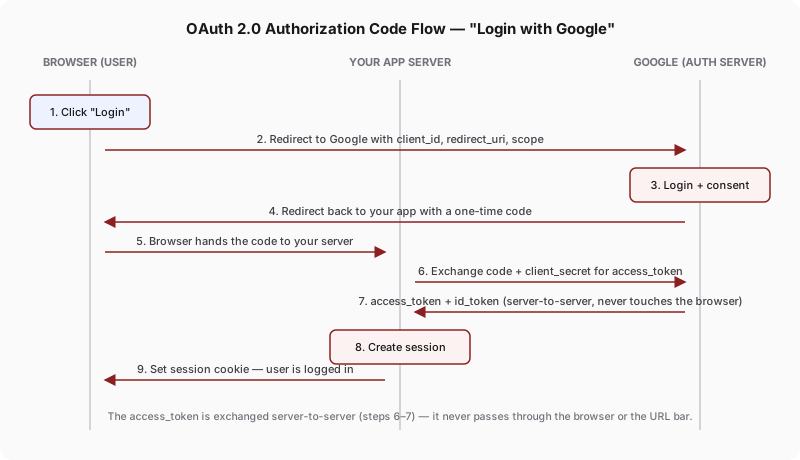
- User clicks "Login with Google" on your site.
- Your app redirects the browser to Google's authorization endpoint, with your
client_id, aredirect_uri, thescope(what you're asking permission for — e.g. "read their email"), and astateparameter (covered in the CSRF section below). - Google shows a login/consent screen. The user authenticates directly with Google — your app never sees, touches, or has the opportunity to log their Google password.
- Google redirects back to your
redirect_uriwith a short-lived, single-use authorization code in the URL query string, plus the samestatevalue you sent. - Your backend exchanges that code — along with your app's secret
client_secret— for an access token (and, for OpenID Connect, an ID token) by calling Google directly, server-to-server, at a token endpoint. - Your backend uses the access token to call Google's API on the user's behalf, and typically creates its own session (a cookie) so the user stays logged in to your app going forward, independent of Google.
Browser                     Your App (Client)                 Google (Auth Server)
   |                              |                                    |
   |--- clicks "Login" ---------->|                                    |
   |                              |--- redirect to Google ------------>|
   |<---------------------------- redirect w/ client_id, scope, state -|
   |--- follows redirect, logs in & consents at Google ---------------->|
   |<--- redirect back to redirect_uri with `code` + `state` ----------|
   |--- browser forwards code -->|                                    |
   |                              |--- POST code + client_secret ----->|  (server-to-server)
   |                              |<--- access_token, id_token --------|
   |                              |--- calls Google API w/ token ----->|
   |<--- sets session cookie -----|                                    |